

If you’ve ever looked at your codebase and thought, “This is getting out of hand…”, you’re not alone.
I’ve worked on projects where one bug fix caused four new issues. Every layer was tangled, business logic leaked into controllers, and changing anything felt risky. Sound familiar?
As projects grow, so does the complexity. Layers start blending, responsibilities get messy, and suddenly… one small change breaks three different modules. That’s where Clean Architecture comes in, not as a silver bullet, but as a powerful guideline to write software that is maintainable, scalable, and testable from day one.
In this guide, we’ll break down:
What Clean Architecture really means (beyond the buzzword)
Why it matters for your career and your team
And how to start applying it, even in small .NET projects, structuring your layers and folders
Let’s make your architecture clean, your codebase happier, and your future self proud.
What Is Clean Architecture?
Clean Architecture is a software design approach that separates concerns and enforces boundaries between different parts of your system, placing emphasis on maintaining the organization and structure of the code so that it remains resilient to change.
As your system grows, tightly coupled code turns small changes into breaking ones. If your domain logic depends on Entity Framework, ASP.NET controllers, or some external API, any refactor can trigger a cascade of unintended side effects.
Clean Architecture flips that dependency flow, infrastructure depends on the core, not the other way around.
By separating concerns, you give each layer one job:
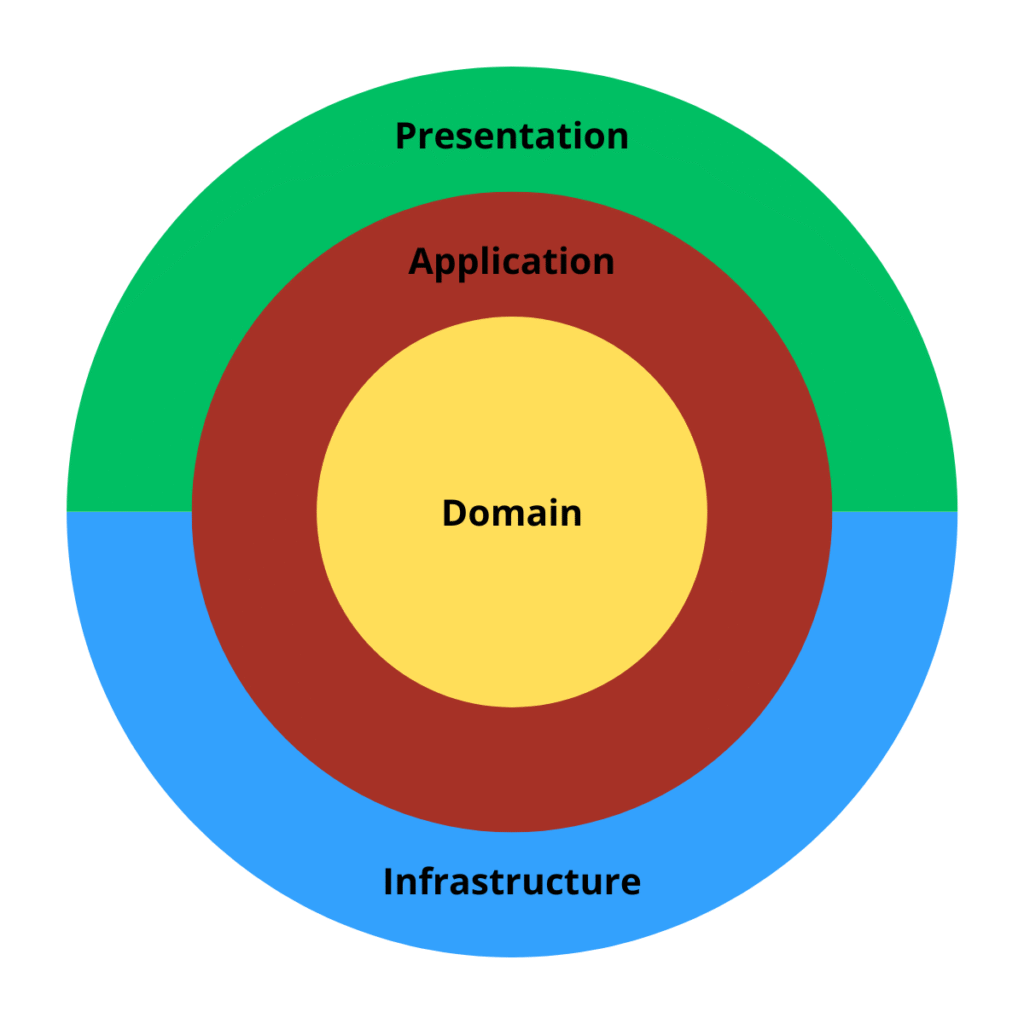
1. Domain Layer (The Heart)
This is the core of your system. It contains:
				📁 Domain
├── 📁 DomainEvents
├── 📁 Entities
├── 📁 Enumerators
├── 📁 Constants
├── 📁 Exceptions
├── 📁 Repositories
├── 📁 Shared
└── 📁 ValueObjects
- Entities (business objects with rules)
- Value Objects, Enums
- Repositories
The Domain layer should never reference any other projects in your solution. It’s designed to be completely independent of frameworks, databases, and user interfaces. This ensures that the core of your application remains isolated and free from any unnecessary dependencies, making it easier to maintain and evolve over time.
It knows nothing about EF Core, HTTP, or even that it’s running in a web app. It’s 100% pure C#, and that’s the point.
2. Application Layer
This layer contains:
				📁 Application
├── 📁 Abstractions
    ├── 📁 Data
    ├── 📁 Email
    └── 📁 Messaging
├──  📁 Behaviors
├──  📁 Contracts
├──  📁 User
     ├── 📁 Commands
     └── 📁 Queries
├──  📁 Order
     ├── 📁 Commands
     └── 📁 Queries
│
└── 📁 UseCases #(Optional)
- Use Cases / Application Services
- Interfaces for dependencies (like repositories, queues, etc.)
- Behaviors
- Entity Folders (For each entity in the domain I like to create a folder)
- Command and query (Related to CQRS pattern)
It coordinates actions using the domain. Think of it as the place where you define what the system should do, without worrying how it does it.
3. Infrastructure Layer
This layer implements the abstractions defined in the Application layer.
Examples:
				📁 Infrastructure
├── 📁 Data
    ├── 📁 Repositories
    ├── 📁 Migrations
    └── 📁 DataContext
        └── ApplicationDbContext.cs
├── 📁 Messaging
├── 📁 Services
└── 📁 Jobs
- Email/SMS providers
- File storage
- External API integrations
- Message queues (RabbitMQ, Kafka)
It depends on Application and Domain, but they don’t depend on it. This keeps your core logic clean and testable.
4. Presentation Layer
This is how users or clients interact with your app:
				📁 Presentation
├── 📁 Controllers
├── 📁 Middlewares
├── 📁 Extensions
├── 📁 Endpoints                  # For projects with Minimal APIs (optional)
└── 📁 ViewModels                 # Custom display templates for UI or frontend (optional)
- ASP.NET Controllers or Minimal APIs
- Extensions
- Middlewares
It receives input, calls the Application layer, and returns output. No business rules here, just translation between the outside world and your system.
The flow goes inward:
Presentation → Application → Domain
But dependencies are inverted, outer layers reference the inner ones, never the other way around:
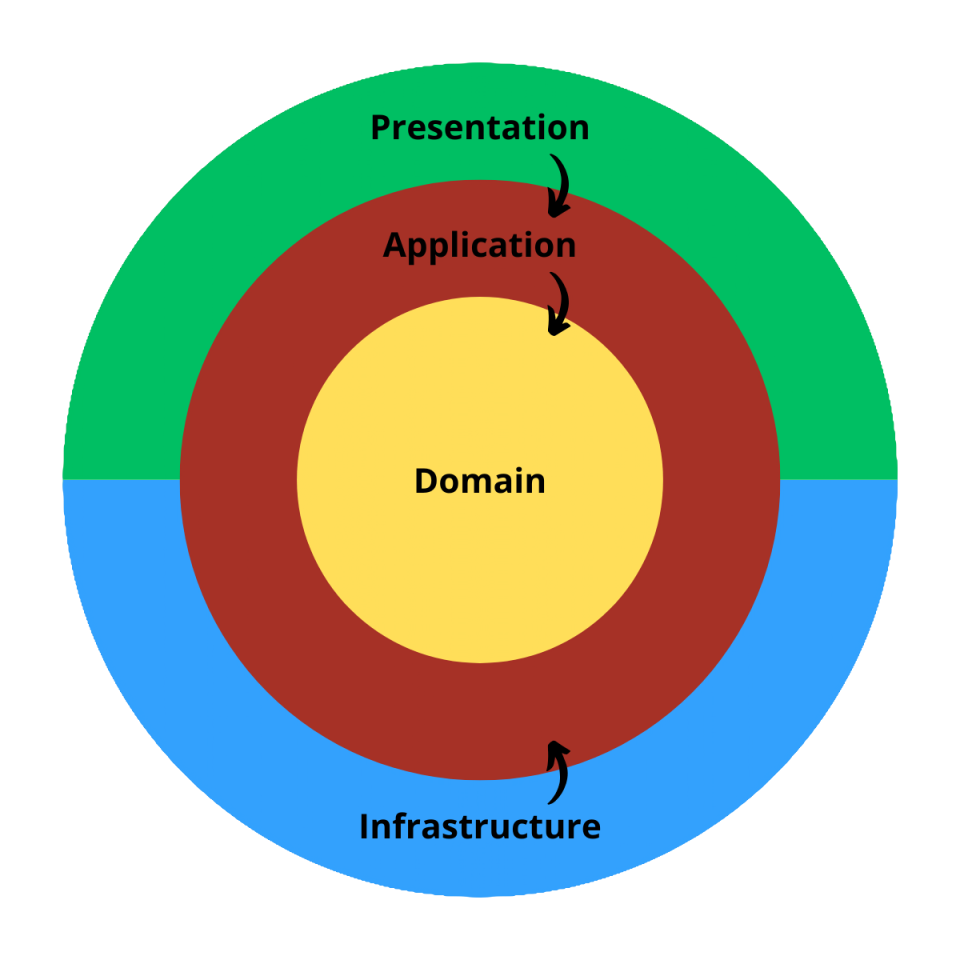
Those concentric circles you always see in Clean Architecture diagrams aren’t just for decoration, they have a very intentional meaning.
This structure enforces clear boundaries between layers and keeps your code clean, decoupled, and future-proof.
So next time you see those famous Clean Architecture circles… now you know they’re more than just a cool drawing.
Benefits of Using Clean Architecture
Clean Architecture isn’t just a fancy buzzword, it brings real, long-term advantages to your project:
Separation of Concerns
Each layer has a clear purpose. Business rules live in the Domain layer, use cases in Application, infrastructure details in Infrastructure, and controllers/endpoitns in Presentation. This keeps your codebase organized and easy to navigate.Testability
Because your core logic is decoupled from frameworks and external dependencies, writing unit tests becomes straightforward. You can test your business rules without bootstrapping a full web server or database.Flexibility and Maintainability
Want to swap out the database? Change the email provider? Migrate from REST to gRPC? No problem, these are all infrastructure concerns, and your core application doesn’t even know they exist.Long-Term Scalability
When your application grows, Clean Architecture makes it easier to onboard new devs, refactor parts of the system, and add new features without breaking existing ones.Framework Independence
Frameworks come and go, your core logic shouldn’t depend on them. Clean Architecture allows your business logic to live beyond the lifetime of any specific tech stack.
Why Should You Care?
You might be wondering: “Isn’t this just overengineering…”
Not at all.
Clean Architecture helps you write code that survives deadlines, tech migrations, team changes, and unexpected feature requests. It forces you to think in terms of boundaries, responsibilities, and long-term value, instead of quick hacks that will haunt you six months later.
If you’ve ever worked on a project where fixing a bug breaks five unrelated features, you already know why this matters.
Clean Architecture isn’t about being fancy.
It’s about writing software that doesn’t collapse under its own weight.
Wrapping Up
Clean Architecture isn’t just a theoretical concept, it’s a practical guide for building software that’s scalable, testable, and easy to maintain.
By clearly separating responsibilities and enforcing boundaries, you gain more control over your codebase and reduce the cost of change over time. Whether you’re starting a new project or refactoring an existing one, this approach can bring clarity and long-term stability.
And remember: it’s not about following a rigid, It’s about writing code that survives change. These are practices I personally enjoy applying in my projects, but keep in mind: Clean Architecture is a guideline, not a strict rulebook, there are many ways to implement it, and each project comes with its own context and challenges.
Don’t get too attached to folder structures or diagrams, adapt the principles to fit your reality and focus on writing clean, maintainable code.
Thank you for reading.
See you next time!


