Every turn, an agent looks like it remembers the whole conversation.
It doesn’t.
The model is stateless, text in, text out.
Nothing carries over on its own. So on every call you rebuild the entire context and send it all again.
In this article, I’ll walk through what AI agent context management actually is and how the Microsoft Agent Framework keeps that context under control for you in .NET.
What’s Actually Inside the Context
Every turn of the agent loop makes one call to the LLM, passing a single block of text: the context. It isn’t free-form, it’s assembled from four parts:
- System prompt — rules and persona.
- Memory — facts you want to keep across turns.
- Message history — the back-and-forth between you and the agent, plus its reasoning.
- Tool calls + results — everything the loop appended while working.
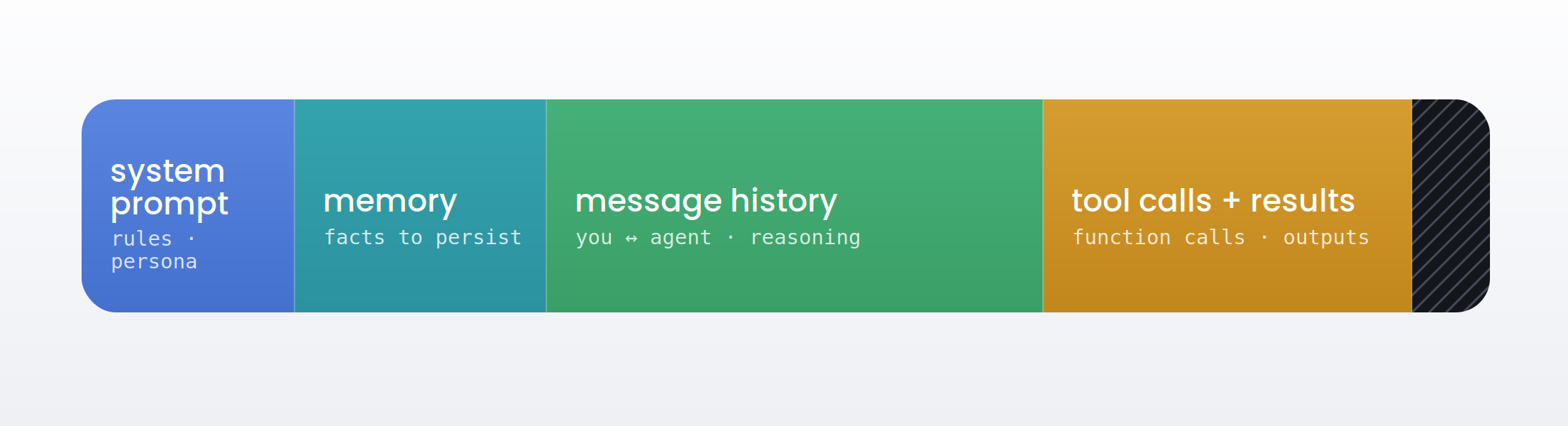
That block has a hard ceiling: the model’s max context window. And here’s the problem, message history and tool results grow every single turn. Left alone, a tool-heavy agent eventually blows past the window, and your calls get slower and more expensive on the way there.
Context management is the component that decides what goes into that block and what stays out, what to keep, what to summarize, and what to drop before each call.
Context Management in the Microsoft Agent Framework
You could build all of this yourself, a loop that counts tokens, compacts old turns, and stashes anything important somewhere safe. The Agent Framework already ships it as the agent harness, so you don’t have to. Instead of wiring that plumbing by hand, you hand the agent a token budget and let the harness keep the context under it.
You wrap a chat client with AsHarnessAgent and pass the max context window. Under the hood it wires in in-loop compaction, before the context overflows, the harness compacts older turns to stay within budget, plus a file memory store, so anything important can be written to disk and survive that compaction.
				dotnet add package Microsoft.Agents.AI
dotnet add package Azure.AI.Projects
dotnet add package Azure.Identity
				const int MaxContextWindowTokens = 1_050_000;
const int MaxOutputTokens = 128_000;

// AsHarnessAgent wires in in-loop compaction + file memory, so the context
// stays under budget automatically — no manual trimming in your loop.
AIAgent agent = new AIProjectClient(new Uri(endpoint), new DefaultAzureCredential())
    .GetProjectOpenAIClient()
    .GetResponsesClient()
    .AsIChatClient(deploymentName)
    .AsHarnessAgent(MaxContextWindowTokens, MaxOutputTokens, new HarnessAgentOptions
    {
        Name = "ResearchAgent",
        FileMemoryStore = new FileSystemAgentFileStore( // written data survives compaction
            Path.Combine(AppContext.BaseDirectory, "agent-files")),
        ChatOptions = new ChatOptions { Instructions = instructions }
    });
Two numbers do the heavy lifting: MaxContextWindowTokens is the budget the harness compacts against, and the FileMemoryStore is where the agent parks results it can’t afford to lose, a research report, say, so a compaction pass never silently drops them. You never wrote a trimming loop; the harness runs compaction inside the agent loop for you.
Need finer control over what gets cut? The lower-level primitive is still there, an IChatReducer on the history provider (MessageCountingChatReducer to keep the last N messages, SummarizingChatReducer to compress them). The harness just wires that whole machinery up for you.
Why This Matters for Architecture
Three things to keep on your radar in production:
Cost and latency scale with context size, so trimming isn’t optional at volume, it’s what keeps the bill flat, the compaction strategy is a real decision.
Truncation is cheap but forgets, summarization keeps meaning but costs an extra model call, and what you drop is a correctness risk.
Cut the wrong turn and the agent “forgets” a detail the user gave it three messages ago.
Context management is where you make those tradeoffs on purpose instead of by accident.
One MAF-specific note: the harness compacts client-side, which is why it needs your token budget up front.
On Foundry’s hosted agents, session state is managed for you, the service handles size, and your file memory persists across runs.
Final Thoughts
The model doesn’t remember anything, you rebuild the context every turn, and it can’t grow forever.
Context management is the component that decides what makes the cut.
In the Microsoft Agent Framework, the harness makes that call for you, you just hand it a budget.